Start with a template
Choose a profile and size from the library, then open it in the editor. You can download the original PDF straight away, but opening the template gives you room to change the blade, tang and holes before printing.
A blank drawing is there if you want to start from nothing. For a knife based on one of these shapes, I would begin with the template so the knife-specific dimensions and handle controls are ready to use.
For the help reference, open the editor and choose Help in the header beside Account, or press ? on your keyboard. On smaller screens, look for the question-mark icon. The reference explains the tools, drawing marks, printing, saving and keyboard shortcuts.
Set the proportions
It's good to start with blade length, heel height and the handle length/size. Blade length is the blade itself, without the tang. Keep an eye on the overall length as you go, especially if you are working around a particular piece of steel.
Changing blade length and resizing the whole knife do different things. After resizing, have another look at the handle. You might like a shorter blade without wanting a shorter grip as well.
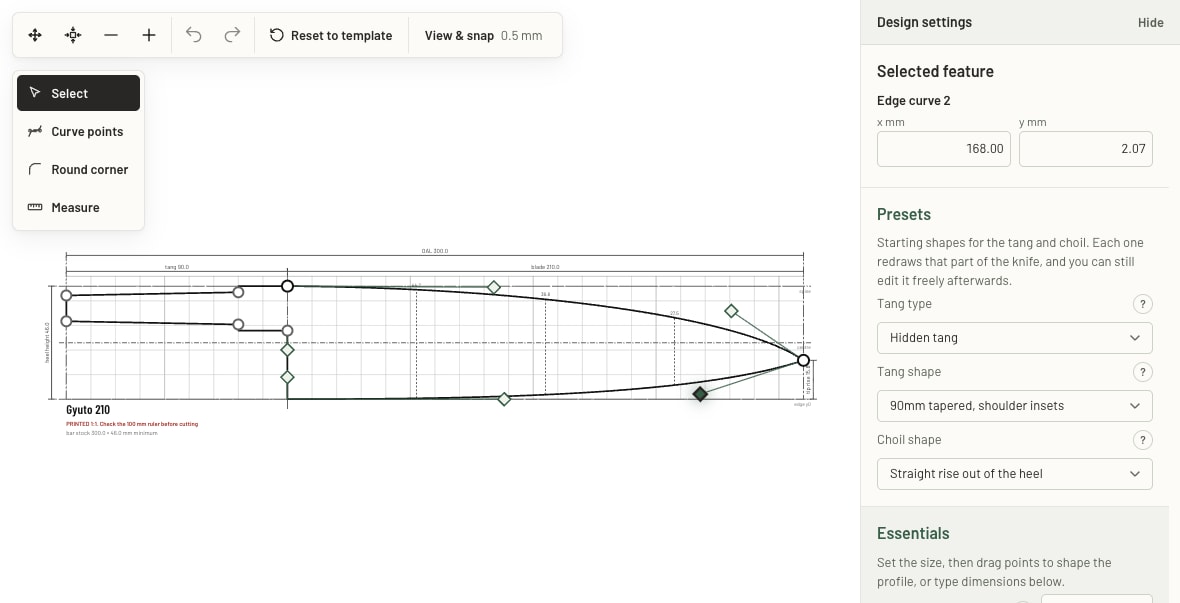
Shape the blade, handle, and choil
Drag the points and curve handles, or type a value when you know the measurement you want. Undo and Redo are useful for comparing a change with what you had before.
There are presets for tangs and choils, add new nodes and play with the curve handles to start getting creative with the shape. Lay out the holes and check the clearance from the edges, the measurement tool can help here.
Save and come back
A free account also lets you explicitly save it to your online library, otherwise your current drawing is kept in this browser as you work.
Export as PDF, SVG or DXF. When you are ready to print, choose the paper, look over the tiled sheets and print at Actual size or 100%. Measure the ruler after printing. Arrange on stock is there when you want to fit several blanks onto a bar.
Comments
Questions, corrections and what worked for you. Upvote comments you find useful.
Loading comments…