Shape and editing
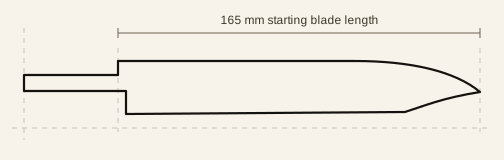
The heel height gives the profile useful depth while the low tip avoids turning the outline into a short Gyuto. Curve controls let you tune the edge and spine while preserving precise dimensions.
The base template is fully adjustable. Type exact measurements, drag the profile controls, set tang dimensions, add holes and marks, or convert the result into an editable node outline.
Choose a starting size
The 165 mm starting size can be edited proportionally or dimension by dimension. Use the 100 mm calibration ruler on every print to confirm the paper output before transferring the outline to material.
Every output should be checked before fabrication. Printer settings can change scale, so print at 100 percent and measure the calibration ruler on the finished sheet.
Files for the next step
Use PDF for a prepared print file, drawing SVG for the complete annotated profile, cut line SVG for a clean outline, or DXF for compatible CAD and cutting software. You can also save the editable design as JSON.